

Sometimes Instagram will not open on your school, office, or home network. The app may show an error, or the site may stay blocked. In that case, many people search for Croxy Proxy Instagram, a way to open Instagram through a free web proxy. CroxyProxy is a website that loads other websites for you, so you can reach Instagram without installing an app or a VPN. In this guide from DonglyTech, you will learn what CroxyProxy is, how it works, the steps to open Instagram with it, what works and what does not, and how to stay safe while you use it.
Table of Contents
What Is CroxyProxy?
CroxyProxy is a free web proxy service. A web proxy is a website that acts as a middle step between your device and the website you want to visit. You open the proxy site, type the address of the site you want, and the proxy loads that site for you. Instagram sees the proxy server, not your own network address. The official CroxyProxy site says the basic version is free, and you do not need to download or set up anything. You can read the service on its own site at CroxyProxy.
CroxyProxy supports modern websites and web apps, and it lists video and audio playback among its features. That is why people use it for sites like YouTube, Facebook, and Instagram. It works on many systems, including Android and Chrome OS, because all you need is a browser.
How Croxy Proxy Instagram Works
When you use Croxy Proxy Instagram, your request follows a short path. First, you type the Instagram address into the box on the CroxyProxy home page. Next, CroxyProxy sends that request to Instagram from its own server. Then Instagram sends the page back to the proxy, and the proxy shows it to you. The network you are on sees a connection to CroxyProxy, not a direct connection to Instagram.
The proxy also hides your real network identity from the site you visit, and the official site says your traffic to the proxy is encrypted. But it does not mean the proxy is private in the same way as your own connection. The proxy still sits in the middle, so it can see the pages you open through it.
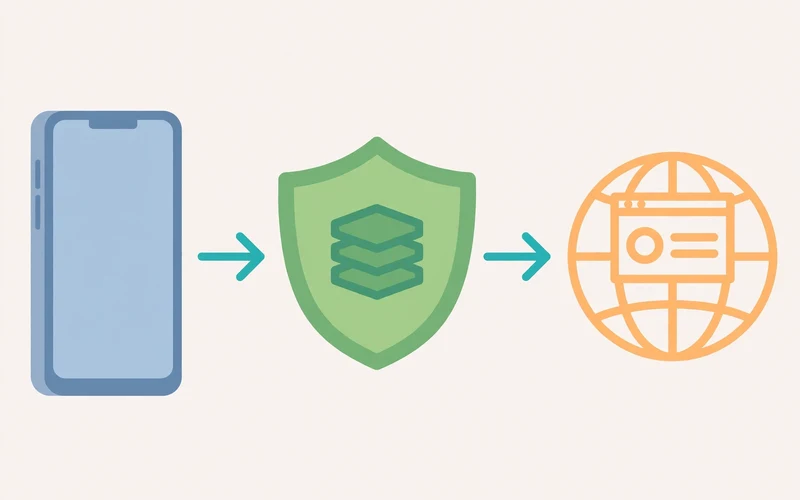
Your request goes to the proxy server first, and the proxy loads Instagram for you.
How to Open Instagram With CroxyProxy Step by Step
You can open Instagram without app installs through CroxyProxy in a few steps. You need a browser, an internet connection, and the Instagram address.
- Open your browser on a phone or a computer.
- Go to croxyproxy.com and check that the address starts with https.
- Find the box on the home page that says to enter a URL. You may also see a quick link for Instagram below the box.
- Type www.instagram.com in the box and press Go.
- Wait a few seconds while the proxy connects and loads the Instagram page.
- When the sign in page shows, browse public posts without an account, or log in with your username and password.
- Log out when you finish, above all on a shared device.
If the page loads slowly, wait a little longer before you press refresh. Free proxy servers are shared by many people at once, so the load time can change from one try to the next.
What Works Well and What Does Not Work Well
A free web proxy is handy, but it is not the same as the Instagram app. Some parts of Instagram work fine through the proxy, and some parts struggle.
These things usually work well:
- Opening the Instagram website and viewing public profiles and posts.
- Scrolling the feed and looking at photos after you log in.
- Watching short clips and stories when the connection is steady.
- Using Instagram on a network where the site is blocked.
- Opening Instagram without installing any app or software.
These things often work poorly or fail:
- Logging in can fail. Instagram may show an error about an open proxy because many people share the same proxy address.
- Instagram may ask for a verification code because the login comes from a new place.
- Stories and reels may load slowly or stop, because video needs a fast and steady link.
- Uploading photos or videos can be slow or may fail through the proxy.
- Direct messages may feel slow, and some buttons may not respond as they do in the app.
- Some features may not work at all through a web proxy.
Guides that cover this topic note the same limits: the free version shows ads, speeds can drop when the servers are busy, and not every Instagram feature is supported. Treat Croxy Proxy Instagram as a quick way to view Instagram, not as a full replacement for the app.
Croxy Proxy Instagram Login Problems and Fixes
Instagram proxy login trouble is the most common problem.
- Clear your browser cookies and cache, then try to log in again with a fresh page.
- Pick a different proxy server on the CroxyProxy home page, for example another country server from the menu.
- Make sure two factor authentication is on for your Instagram account, so you can pass the check when Instagram asks for a code.
- Type your username and password with care. Fast repeated likes or follows right after login can look like bot activity.
- Try again after a short break if Instagram still blocks the login.
If Instagram keeps asking for a code, check the email or phone linked to your account and enter the code Instagram sends. You can learn more in this detailed CroxyProxy guide to unblocking YouTube and Instagram, which covers login errors and server changes.
Is Croxy Proxy Instagram Safe to Use?
CroxyProxy is a real and widely used free web proxy, and its own site says your traffic to the proxy is encrypted. But a free proxy is never fully private. Your traffic flows through the proxy server, so the proxy can see the pages you open and the data you send.
Follow these safety rules every time you use Croxy Proxy Instagram:
- Use it for public browsing only. Read public posts and watch public clips without an account when you can.
- Never log in with an important account on a proxy you do not fully trust. Your Instagram password and private messages pass through the proxy.
- Do not enter bank details, card numbers, or other sensitive data while you are on a proxy.
- Do not save your login in the browser on a proxy, above all on a shared or public device.
- Log out of Instagram and close the tab when you finish.
- Check the address bar before you type a password. Make sure you are on the real CroxyProxy site, not a copy with a similar name.
Also follow the rules of your school or workplace. A proxy can act as an Instagram unblock tool, but if your school or office bans proxy use, breaking that rule can lead to trouble.
Croxy Proxy Instagram Free Version and Premium Option
The basic version of CroxyProxy is free, and you can use it without an account. The free version shows ads, and that is how the service pays for its servers. Speed can drop when the free servers get busy. CroxyProxy also offers a premium option from the Premium button on its home page. Check the current offer on the official site before you pay for anything, because plans can change.
Safe Alternatives to Croxy Proxy Instagram
If the proxy feels slow or the login keeps failing, try one of these safer options first.
- Use the Instagram app on your own phone with your own mobile data. Mobile data often works even when a Wi-Fi network blocks Instagram.
- Open instagram.com directly in your browser when the network allows it. The direct site is faster and more stable than any proxy.
- Use a trusted VPN app from a known provider if you need a private link for all your apps.
- Wait and try later if Instagram itself is down. A proxy cannot fix a problem on Instagram’s own servers.
The Instagram app on your own phone is the smoothest way to use Instagram each day.
For more simple how to guides, see our guide on 10.0.0.1 pause time settings and our guide to Techgues com.
Tips for a Smooth Croxy Proxy Instagram Experience
A few small habits make Croxy Proxy Instagram work much better.
- Use a modern browser and keep it updated, so the proxy pages load as they should.
- Close extra tabs before you open the proxy.
- Try a different server if the first one is slow or shows an error.
- Skip the ads inside the free proxy pages and stay on the Instagram page.
- Log out and clear the browser data after you finish on a shared device.
Final Thoughts
Croxy Proxy Instagram is a simple and free way to open Instagram in your browser when the direct site is blocked. You type the Instagram address into CroxyProxy, the proxy loads the page for you, and you can browse without installing anything. It works best for viewing public posts and scrolling the feed. Login can fail, videos can lag, and uploads may not work well, so it is not a full replacement for the app. Use it for public browsing, guard your password, and log out when you finish.
FAQs
What is Croxy Proxy Instagram?
Croxy Proxy Instagram means opening Instagram through CroxyProxy, a free web proxy. You go to croxyproxy.com, type the Instagram address, and the proxy loads Instagram for you without any install.
Is CroxyProxy free to use?
Yes, the basic version of CroxyProxy is free, and you do not need to install anything or create an account. The free version shows ads, and a premium option is also offered on the official site.
Can I log in to Instagram through CroxyProxy?
Yes, you can try to log in after the Instagram page loads through the proxy. But login can fail because Instagram may flag the shared proxy address, and it may ask for a verification code.
Is it safe to log in to Instagram on a free proxy?
It carries risk. Your traffic passes through the proxy server, so the proxy can see what you send. Use the proxy for public browsing when you can, never enter bank or card details through it, and log out when you finish.
Why is CroxyProxy slow or not working for Instagram?
Free servers are shared by many users, so they can get busy and slow. Try a different server from the menu, clear your browser cache, and try again. If Instagram itself has a problem, a proxy cannot fix it.
